


Overview
The Smart Date Sequence is a Logic step in your Flow that dynamically directs contacts to the most relevant timer based on the current date. It’s perfect for managing time-sensitive workflows, such as scheduling actions for holidays, events, or seasonal campaigns, by ensuring contacts jump to the appropriate point in the sequence.
Extension Required!
The Smart Date Sequence Logic is available with the Advanced Features addon. It can be purchased separately or as part of the Agency, Pro or Plus Plans.
When to Use
Use the Smart Date Sequence when you need to control the flow of contacts based on specific dates, such as for holiday email campaigns, event reminders, or time-bound promotions. It’s ideal for scenarios where actions need to align with the closest upcoming date in a sequence.
How It Works
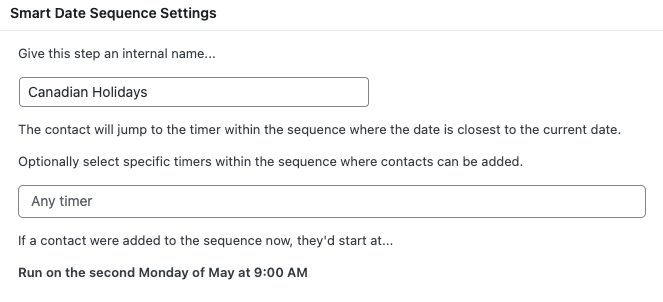
The Smart Date Sequence evaluates the current date and moves contacts to the timer within the Flow that is closest to that date. You can define multiple timers in the sequence, each tied to a specific date (e.g., “Run on the 1st January at 9:00 AM”). When a contact enters the Flow, this Logic step ensures they proceed to the timer most relevant to the current date. You can also specify which timers contacts can be added to (e.g., “Any timer”) and set a fallback start date for new contacts (e.g., “Run on the second Monday of May at 9:00 AM”). Additionally, you can pair it with other Logic steps, like “Stop the Flow,” to filter contacts based on conditions.
Setup Instructions
- In your Flow editor, navigate to the “Logic” tab.
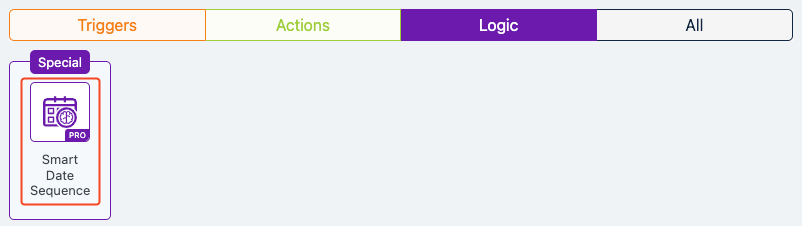
- Select “Special” and choose the “Smart Date Sequence” Logic step.
- Give the step an internal name (e.g., “Canadian Holidays”).
- Optionally, define which timers contacts can be added to (e.g., “Any timer”).
- Save and activate the Flow.
Example Use Case
A marketing team sets up a Holiday Flow to send New Year’s greetings to Canadian customers. They add a Smart Date Sequence Logic step named “Canadian Holidays,” followed by a timer set to “Run on the 1st January at 9:00 AM” and an action to send a “[Canadian Holidays] New Years” email. A “Holiday Emails” tag is applied to contacts entering the Flow. If a contact joins in late December, the Smart Date Sequence directs them to the New Year’s timer as it’s the closest upcoming date. A “Stop the Flow” step ensures certain contacts (e.g., those not meeting specific criteria) are removed. For contacts entering after January, a fallback schedules them to start on the second Monday of May at 9:00 AM for the next campaign.
FAQs / Troubleshooting
Q: Why are contacts not moving to the correct timer?
A: Ensure the timer’s date and time are correctly set in the sequence. Also, verify that the Flow is active and that the contact meets any conditions specified for the timer.
Q: Can I prevent certain contacts from continuing in the Flow?
A: Yes, use a “Stop the Flow” Logic step with conditions (e.g., include/exclude filters) to remove contacts who don’t meet the criteria from the Flow.
Was this helpful?
Let us know if this document answered your question. That’s the only way we can improve.