Documentation » Troubleshooting
Caching Compatibility
Caching is great for speeding up your site, but it can be a problem when you have dynamic content and site personalization, and all of a sudden visitors are seeing stuff they aren’t supposed to.
Cache Recommendations
We recommend adding the following exclusions to your caching plugin or host’s caching settings to ensure site personalization works and the preferences center works.
Cache TTL
Most caching systems provide an option to set a page cache cache TTL (time-to-live) which determines how long a cached page will be served.
Groundhogg forms use a WordPress security system called nonces (as do many other plugins) which have a valid lifetime of 12 hours.
Therefore, it would be prudent to set your page cache, or other content cache TTLs to 12 hours or shorter to avoid nonces used on the frontend of your site from expiring, preventing forms from being submitted.
This can, but doesn’t necessarily apply to assets like JavaScript, CSS, or images.
Cookie exclusions
When you exclude cookies from caching, what it usually means is that if the cookie is present, then the cache will be bypassed and the content will be served dynamically.
If you are serving dynamic content using either site personalization or content restriction then ensuring the follow cookies are excluded should be enough to cover most situations.
groundhogg-tracking
gh-permissions-key
A visitor will get these cookies by either clicking a tracking link in an email or by submitting a form, at which point site caching will be bypassed for the whole site and they will see dynamically generated content.
Page Exclusions
To be on the safe side, you can also exclude specific pages which are often going to show dynamically generated content, regardless of cookie presence.
One of these pages in Groundhogg is the Preferences Center which is usually /gh/* on your site. It would be apt to exclude it from caching as well.
We’ve highlighted some common caching plugins and systems and the expected format of the exclusion for your convenience.
| Caching Plugin | Recommended Exclusions |
|---|---|
| WP-Rocket | /gh/(.*) |
| Comet Cache | ^/gh/ |
| W3 Total Cache | /gh* |
| SG Optimizer (SiteGround) | /gh/* |
| LiteSpeed Cache | /gh |
| Breeze (Cloudways) | /gh/(.*) |
| Varnish (if enabled by server) | ^/gh/ |
| Cloudflare (as a cache bypass rule) | /gh* |
| Redis (You may have to ask your server host) | /gh.* |
If you have other pages on your site where you have lots of dynamically generated content or personalization, you may want to consider excluding them as well.
Rest API Exclusions
Depending on your caching plugin and server environment, GET requests to the Groundhogg API may be cached, but this might not be ideal considering that CRM data changes frequently. It would be prudent to also exclude the REST API endpoints for Groundhogg if you that is the case.
Adding the following exclusion should suffice.
/wp-json/gh/*You should consult your caching programs specific exclusion format before adding.
If you want only to exclude specific endpoints, for example the contacts endpoint you can consult the REST API Playground and add only the desired GET endpoints as exclusions.
Object Caching
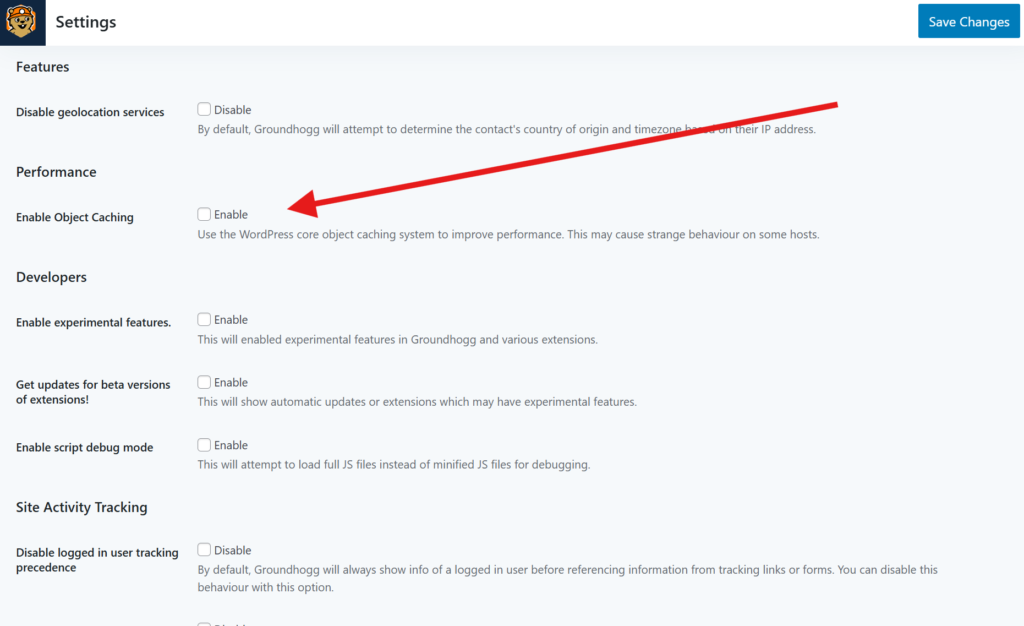
Groundhogg IS compatible with most standard implementations of object caching. By default Groundhogg uses an internal runtime in-memory cache, but you can opt to use object-caching by enabling the Enable Object Caching setting in Groundhogg >> Settings >> Misc >> Performance.