
Documentation » Administration
User Roles & Capabilities
Groundhogg separates most of its functionality into user roles and various capabilities. Below we describe what roles are included.
Administrator
The administrator will always have full privileges and will be able to access anything Groundhogg related.
This includes any settings, as well as editing any contacts. Only give this role to a select few people as everything could be changed when someone has this role.
Marketer
The Marketer role is similar to the existing Editor role in WordPress but with Groundhogg permissions for marketing assets like emails and flows.
This role is useful if you have a team member who you want to manage Groundhogg, but do not want to provide full access to the site to manage things like options and plugins.
Sales Manager
Sales managers by default can see and manage all the contacts on the list, but do not have access to marketing critical components such as broadcasts, reports, or funnels.
The sales manager also has the unique capability of having an assigned team of sales representatives.
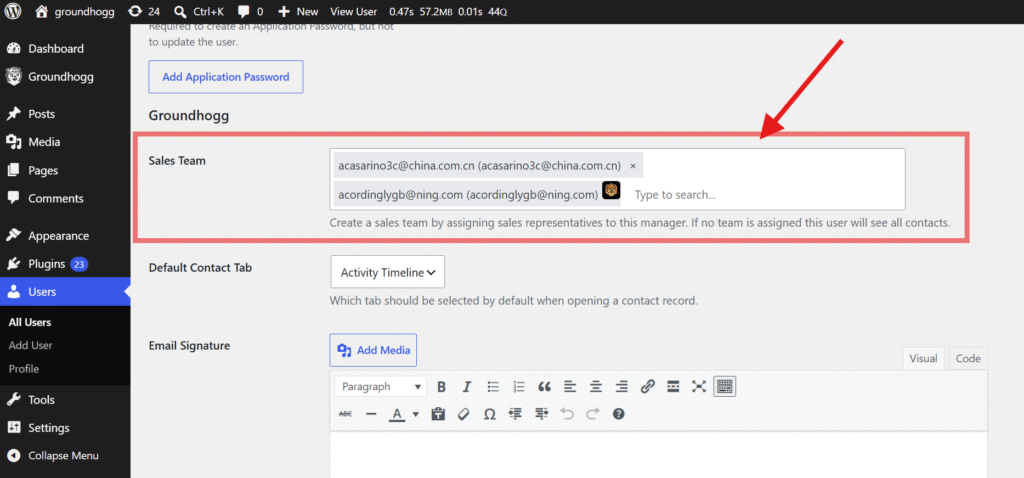
Administrators can add sales representatives to the sales team of a sales manager. If a sales manager has a team, they will only be able to see any contacts assigned to themselves or to their assigned sales representatives.
Sales Representative
Sales representatives can only see and manage their own contacts. They cannot delete contacts, only add. This role if for your sales team, reception and booking staff, telemarketing agencies, etc…
Capabilities
We use capabilities to restrict features in Groundhogg (the proper way). Capabilities can be added, modified, and removed from the default roles or any custom roles you have using a plugin like User Role Editor.
Different add-ons have different capabilites, click on one to expand the capabilities table 👇
Core Capablities
Capability
Administrator
Marketer
Sales Manager
Sales Representative
schedule_broadcasts
✅
✅
❌
❌
cancel_broadcasts
✅
✅
❌
❌
view_broadcasts
✅
✅
✅
✅
add_contacts
✅
✅
✅
✅
edit_contacts
✅
✅
✅
✅
edit_others_contacts
✅
✅
✅
❌
view_contacts
✅
✅
✅
✅
view_others_contacts
✅
✅
✅
❌
delete_contacts
✅
✅
❌
❌
delete_others_contacts
✅
✅
❌
❌
import_contacts
✅
✅
✅
✅
export_contacts
✅
✅
✅
✅
add_emails
✅
✅
❌
❌
view_emails
✅
✅
✅
✅
delete_emails
✅
✅
❌
❌
edit_emails
✅
✅
❌
❌
send_emails
✅
✅
✅
✅
execute_events
✅
✅
❌
❌
cancel_events
✅
✅
❌
❌
schedule_events
✅
✅
❌
❌
view_events
✅
✅
✅
❌
add_funnels
✅
✅
❌
❌
view_funnels
✅
✅
✅
✅
delete_funnels
✅
✅
❌
❌
edit_funnels
✅
✅
❌
❌
export_funnels
✅
✅
❌
❌
import_funnels
✅
✅
❌
❌
add_tags
✅
✅
❌
❌
delete_tags
✅
✅
❌
❌
edit_tags
✅
✅
❌
❌
manage_tags
✅
✅
✅
✅
view_tags
✅
✅
❌
❌
view_reports
✅
✅
❌
❌
export_reports
✅
✅
❌
❌
perform_bulk_actions
✅
✅
✅
✅
manage_gh_licenses
✅
✅
❌
❌
edit_custom_properties
✅
✅
❌
❌
manage_campaigns
✅
✅
❌
❌
download_files
✅
✅
❌
❌
delete_files
✅
✅
❌
❌
view_previous_imports
✅
✅
❌
❌
view_previous_exports
✅
✅
❌
❌
download_contact_files
✅
✅
✅
✅
big_uploads
✅
✅
✅
✅
view_logs
✅
✅
❌
❌
delete_logs
✅
✅
❌
❌
add_notes
✅
✅
✅
✅
delete_notes
✅
✅
✅
✅
edit_notes
✅
✅
✅
✅
view_notes
✅
✅
✅
✅
delete_others_notes
✅
✅
✅
❌
edit_others_notes
✅
✅
✅
❌
view_others_notes
✅
✅
✅
✅
add_tasks
✅
✅
✅
✅
delete_tasks
✅
✅
✅
✅
edit_tasks
✅
✅
✅
✅
view_tasks
✅
✅
✅
✅
delete_others_tasks
✅
✅
✅
❌
edit_others_tasks
✅
✅
✅
❌
view_others_tasks
✅
✅
✅
✅
add_activity
✅
✅
❌
❌
view_activity
✅
✅
❌
❌
edit_activity
✅
✅
❌
❌
delete_activity
✅
✅
❌
❌
Avanced Features Capabilities
Capability
Administrator
Marketer
Sales Manager
Sales Representative
add_superlinks
✅
✅
❌
❌
delete_superlinks
✅
✅
❌
❌
edit_superlinks
✅
✅
❌
❌
view_superlinks
✅
✅
❌
❌
Pipeline Capabilities
Capability
Administrator
Marketer
Sales Manager
Sales Representative
view_pipelines
✅
✅
✅
✅
edit_pipelines
✅
✅
❌
❌
add_pipelines
✅
✅
❌
❌
delete_pipelines
✅
❌
❌
❌
view_deals
✅
✅
✅
✅
view_others_deals
✅
✅
✅
❌
edit_deals
✅
✅
✅
✅
edit_others_deals
✅
✅
✅
❌
add_deals
✅
✅
✅
✅
delete_deals
✅
✅
✅
✅
delete_others_deals
✅
✅
✅
❌
Companies Capabilities
Capability
Administrator
Marketer
Sales Manager
Sales Representative
view_companies
✅
✅
✅
❌
view_others_companies
✅
✅
✅
❌
add_companies
✅
✅
✅
❌
edit_companies
✅
✅
✅
❌
edit_others_companies
✅
✅
✅
❌
delete_companies
✅
✅
❌
❌
delete_others_companies
✅
✅
❌
❌
SMS Capabilities
Capability
Administrator
Marketer
Sales Manager
Sales Representative
add_sms
✅
✅
❌
❌
delete_sms
✅
✅
❌
❌
edit_sms
✅
✅
❌
❌
send_sms
✅
✅
✅
✅