Adrian, Founder here.
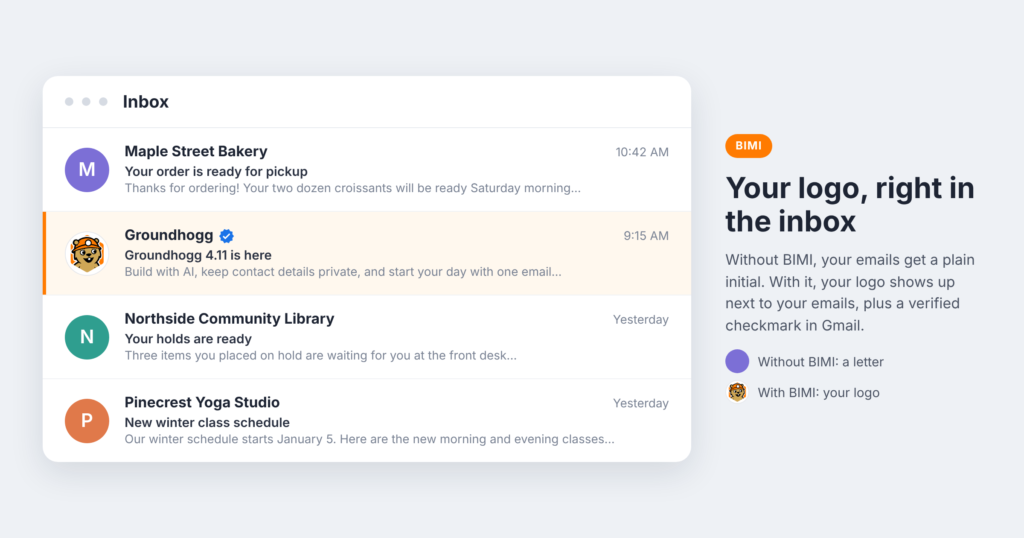
Look at your inbox. Some emails have a logo next to the sender’s name. Most just have a coloured circle with a letter in it. That logo isn’t something the sender uploaded to Gmail. It comes from a standard called BIMI, and as of this week, our groundhog logo shows up next to the emails we send from groundhogg.io in Gmail, blue checkmark and all.
Here’s what BIMI is, why it’s worth doing, and how to tell if it’s right for your business.
What is BIMI?
BIMI stands for Brand Indicators for Message Identification. It’s a DNS record that tells mailbox providers where to find your logo, so they can show it next to your emails in the inbox.
There’s a catch, and it’s the whole point: providers only show your logo if your email passes strict authentication. A spammer can’t put your logo on their email, and neither can someone pretending to be you.
Why BIMI is a good idea
Your emails get noticed
People scan their inbox by sender before they read a single subject line. A recognizable logo stands out in a column of grey initials, and it tells your contacts at a glance that the email is from someone they know.
It builds trust
In Gmail, a Verified Mark Certificate also adds a blue checkmark next to your name, the same way verified accounts work on social media. Phishing emails can’t fake it. For nonprofits asking for donations, or any business sending invoices or receipts, that reassurance matters.
It protects your domain from spoofing
This is the benefit most people overlook. To qualify for BIMI, your domain needs a strict DMARC policy, which tells mailbox providers to reject or quarantine email that claims to come from you but doesn’t. That stops scammers from sending phishing emails that look like they’re from your business.
You get that protection whether or not you ever finish the BIMI setup. Even if you stop at DMARC, you’ve made your domain safer.
It shows you take email seriously
Mailbox providers like Google and Yahoo now expect bulk senders to authenticate their email properly. BIMI sits on top of all of that. Getting it working means your SPF, DKIM and DMARC are in good shape, which is exactly the foundation good deliverability is built on.
What BIMI won’t do
BIMI isn’t a deliverability shortcut. It won’t move your emails out of the spam folder on its own. Inbox placement still depends on your sender reputation, list quality and how people engage with your emails.
It also won’t show everywhere. Gmail, Apple Mail and Yahoo support it. Microsoft Outlook doesn’t yet.
What it takes
- SPF and DKIM for every service that sends email as your domain.
- DMARC at enforcement, set to
p=quarantineorp=rejectfor all of your mail. - Your logo in SVG Tiny PS format, a strict, square version of SVG.
- A mark certificate from a certificate authority like DigiCert.
- A BIMI record in your DNS that points to your logo and certificate.
There are two kinds of mark certificate:
- A Verified Mark Certificate (VMC) needs a registered trademark for your logo. You get the logo and the blue checkmark in Gmail, and it works in Apple Mail.
- A Common Mark Certificate (CMC) doesn’t need a trademark, just proof you’ve used the logo publicly for at least 12 months. You get the logo in Gmail, but no checkmark.
Is it worth it for you?
BIMI isn’t free. We paid US$1,752 for a one-year Verified Mark Certificate from DigiCert. Your price may be different, since it depends on the certificate authority, the type of certificate and how you buy it, but plan on a yearly cost in that general range. On top of that, the validation process takes a few weeks, and a VMC needs a registered trademark if you don’t already have one. So here’s how we’d think about it:
- Everyone should get SPF, DKIM and DMARC right and move DMARC to enforcement. It’s free and it protects your domain today.
- If your logo is a registered trademark, or you’ve used it publicly for over a year, BIMI is a great way to stand out and build trust, especially if email is a big part of how you reach customers or donors.
- If you’re just getting started, focus on your list and your content first. BIMI can wait until your brand is established.
Ready to set it up?
We wrote step-by-step guides for both parts:
- Secure Your Sending Domain covers SPF, DKIM, DMARC and DNSSEC.
- How to Show Your Logo in the Inbox with BIMI walks you through the certificate, the logo file and the DNS record.
If you have questions, let us know. We just went through it ourselves, so we’re happy to help.