Email Replies & Conversations
Replies to your emails are saved to the contact who sent them, so every conversation lives in your CRM.
Most CRMs can send email. Very few can receive it. With Groundhogg’s Incoming Messages, replies to your emails land in your CRM, saved to the contact who sent them, instead of getting buried in your own inbox. Every conversation with a contact lives in one place, right next to their tags, activity and deals.
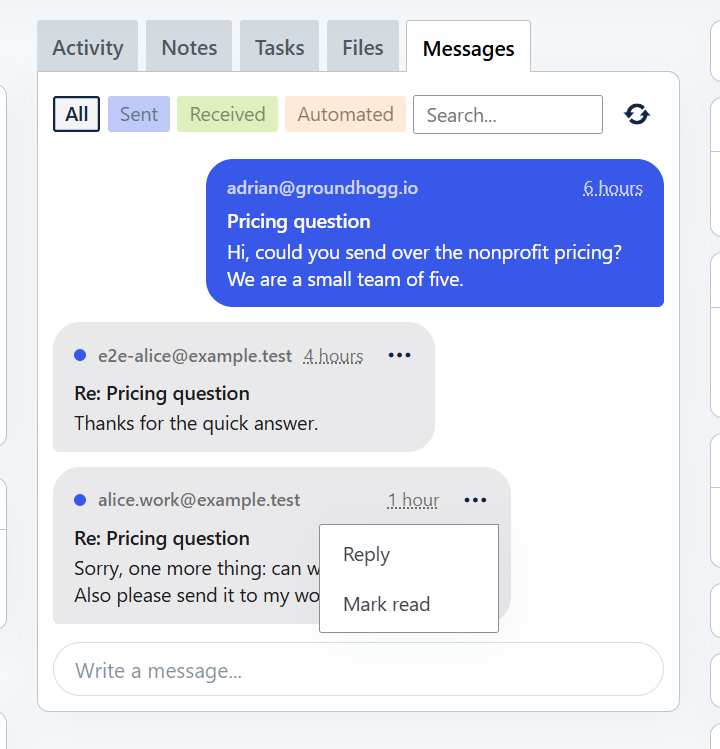
Every Conversation, on the Contact Record
The Messages tab on each contact shows the emails you’ve sent them and every reply they’ve sent back, laid out like a chat. No more digging through your inbox to find out what a lead said last week, or asking a teammate to forward a thread. Anyone on your team who can see the contact can see the conversation.
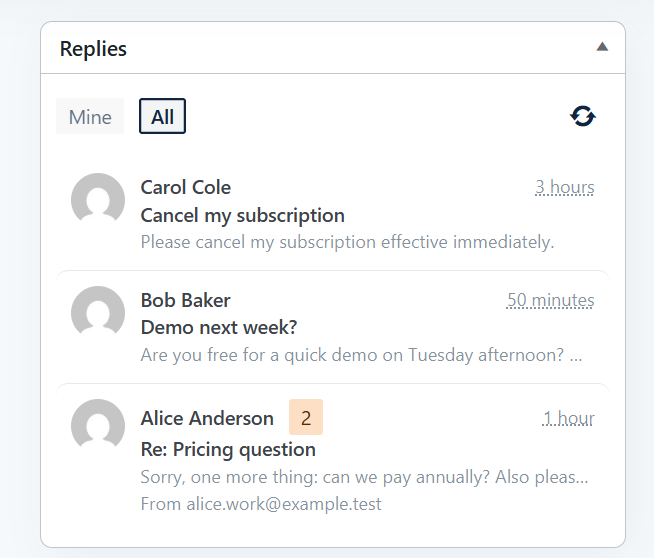
Never Miss a Reply
The Replies widget on your dashboard lists the contacts who’ve replied and the messages you haven’t read yet. Open a conversation right from the dashboard to read it, reply, or mark it read or unread. Away from your desk? Answer replies from the Groundhogg mobile app.
You Choose Which Emails Collect Replies
Turn on Incoming Messages once, then switch on Save replies as messages for the emails you want replies to. It’s perfect for sales follow-ups, onboarding check-ins, and “just hit reply and tell me” newsletters, while your other emails keep replying to your inbox as usual.
Log Emails from Your Own Inbox Too
Your site gets its own private inbox address. BCC it when you email a contact from Gmail, Outlook or any other mail app, and a copy is saved to their Messages tab, so the conversation is complete even when it didn’t start in Groundhogg.
Reply as the Right Person
When you write to a contact, choose who the email comes from out of your sender profiles, so replies keep coming back from the same person your contact has been talking to.
Private by Design
Messages follow the same permissions as the rest of your CRM: people only see the conversations of contacts they have access to, and when you delete a contact, their messages go with them. Your conversations are stored in your own WordPress database, not on someone else’s server.
With Incoming Messages, Groundhogg becomes the place your conversations happen, not just the place your emails are sent from. Learn how to set it up.
Incoming Messages needs an active Groundhogg license.