Backup & Restore
Safely back up and restore your Groundhogg data, or migrate it to a brand new site, without touching the rest of WordPress.

Love it, or get your money back.
All plans and add-ons are covered by our 100% money back guarantee. If for any reason you wish to discontinue, we’ll promptly refund your initial payment.
 Adrian Tobey, founder
Read the refund policy → · Talk to us
Safely Backup & Restore Groundhogg
Bad updates, bad automations, and compromised sites happen. Sometimes you just need to roll everything back. The Backup & Restore add-on backs up your Groundhogg data separately from the rest of your site, so you can restore it in a few clicks without touching your posts, pages, or theme.
Because a Groundhogg backup only contains your Groundhogg tables and settings, it doubles as the fastest way to move your contacts, emails, and flows to a brand new site.
Features
- Back up and restore your Groundhogg data independently of your regular WordPress backups
- Backups and restores run as background tasks and email you when they’re finished, so even large sites won’t time out mid-process
- Backups are written as small, compressed chunks that resume cleanly if interrupted, instead of stalling on one giant file
- Restore onto a new domain or a database with a different table prefix, and Groundhogg automatically rewrites the affected data, so you can use it to migrate or clone a site, not just recover the original one
- Only one restore can run at a time, with a live upload and progress indicator, so two restores can never collide
- Complex Groundhogg settings, not just plain text and numbers, now survive a full backup and restore intact
Migrate or Clone a Site in Minutes
Moving to a new domain or spinning up a staging copy? Take a backup on the source site, then restore it on the destination. Groundhogg automatically rewrites URLs and database table references to match the new site, so there’s no manual find and replace involved.
A Simple, Guided Interface
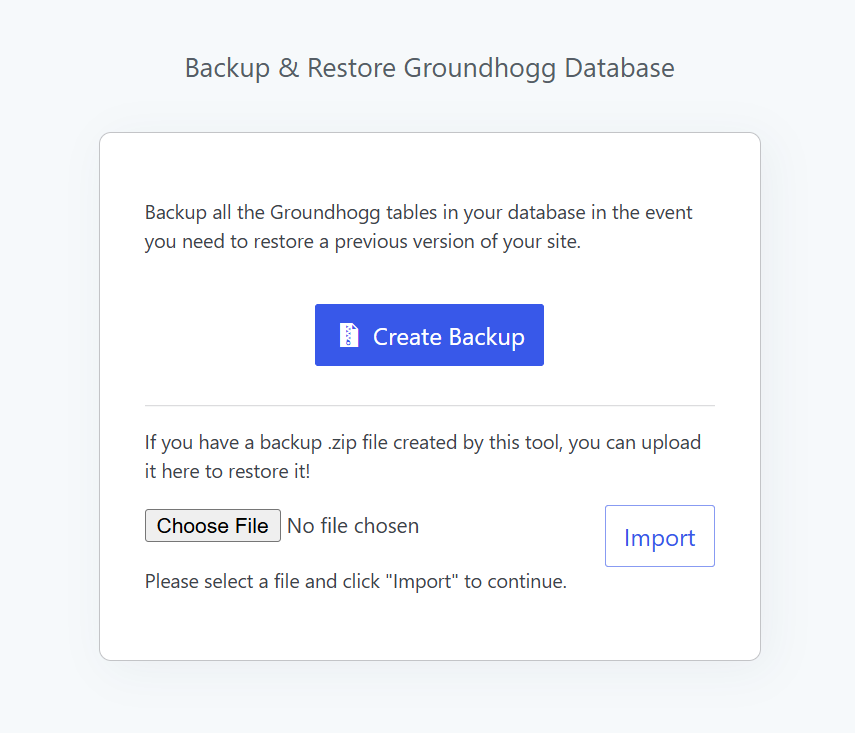
Everything happens from a single screen in your WordPress dashboard. Start a backup and watch it process in the background, then download the finished .zip whenever it’s ready. To restore, upload a backup file. The current status is always visible, including while it’s uploading, so you always know exactly what’s happening.