Hi siteowner,
Groundhogg 4.9 is out today, and nine add-ons are updated alongside it. Here's what's new...
- Receive replies to your emails right inside Groundhogg
- AI assistants can read, edit, test and publish your flows
- A much faster flow editor, with safer publishing
- A shorter guided setup and faster reports
- Updates to Advanced Features, WooCommerce, EDD, GiveWP, AffiliateWP, Sales Pipeline, Companies, Zapier and Traffic Filter
| | 💬 Receive replies in Groundhogg New
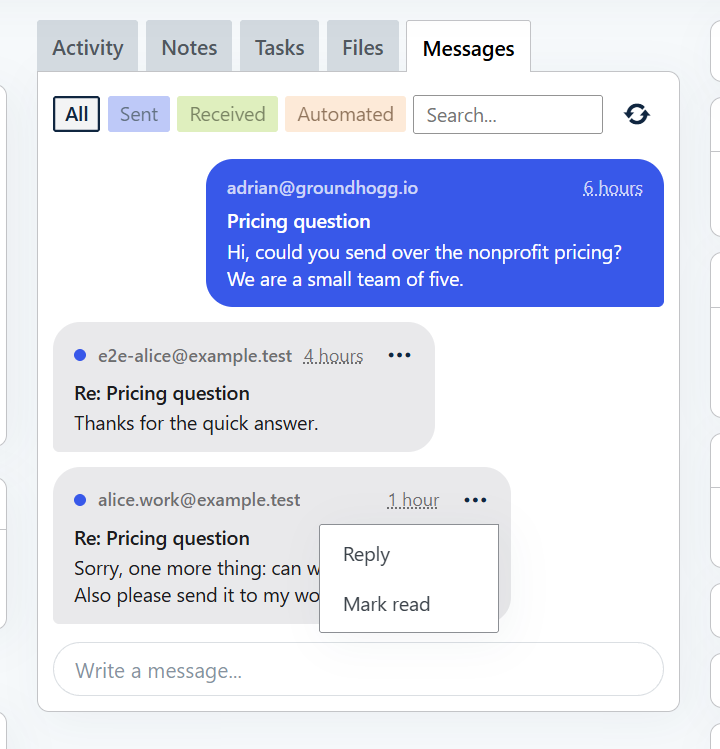
When a contact replies to one of your emails, the reply can now land on their contact record instead of in your own mailbox. Every conversation is in one place, with the contact, and your whole team can see it.
How to use it:
- Turn on Incoming Messages in Settings > Email (this needs an active Groundhogg license).
- In any email's settings, switch on Save replies as messages.
- Open a contact and use the new Messages tab to read the conversation, laid out like a chat, and to reply.
- Check the new Replies dashboard widget for contacts who've replied and haven't been read yet. You can read, reply, or mark a conversation read or unread without leaving the dashboard.
Writing to a contact from your own mailbox? BCC your site's private inbox address and Groundhogg keeps a copy on their record. When you compose an email to a contact you can also choose which of your sender profiles it comes from. | | | | For more details see the messages documentation. | | 🤖 Let an AI assistant work on your flows New
4.8 introduced abilities for contacts, emails and broadcasts. 4.9 adds flows. An AI assistant connected to your site can now read an existing flow, then add, change, move, duplicate, lock or delete its steps, and simulate it before anything goes live.
Edits to an active flow are staged, exactly like in the flow editor. Nothing changes for your contacts until the assistant (or you) publishes, and a bad change can be discarded.
Try asking your assistant:
- “Look at my welcome flow and add a 2 day delay before the second email.”
- “Simulate my staged changes for a test contact, and tell me where they end up.”
- “If the changes look right, publish them. Otherwise discard them.”
- “Build a segment of contacts who opened an email last month but haven't visited the pricing page.”
Segments can now target contacts by behavior: email opens and clicks, page visits, form submissions, flow conversions and more, and they can exclude another segment. Not connected yet? Read the guide to connect an assistant to your site. | | ⚡ A faster flow editor, and safer publishing
The flow editor has been rebuilt. Adding, moving, deleting and changing steps shows right away and saves in the background, and undo and redo now cover step settings, duplicated steps and pasted steps too.
- Decide what happens to waiting contacts. When you publish changes or activate a flow, you choose what happens to contacts waiting at steps you deleted: cancel their events, or move them to another step. Before, they were silently removed.
- History is kept. Deleted steps that contacts have already been through are archived, so reports still work.
- No overwriting a teammate. Only one person can edit a flow at a time, and the editor tells you if a flow or email is changed somewhere else while you have it open.
- Copy and paste between flows. Duplicating a step with branches copies the steps in its branches too, and steps copied from one flow can be pasted into another.
| | 🔧 Worth a look after you update
A few fixes change how existing flows behave, so they're worth knowing about:
- A trigger's Can be triggered limit, like “At most once per contact”, was never enforced. It is now, so check any flows that relied on a limit.
- Delay timers set for the last day of the month, or the 29th to the 31st, now run on the right day.
- Public forms are limited to 20 submissions per form, per IP address, every 10 minutes. People who can add contacts aren't limited.
- There are also two security hardening fixes, one for the support access user. Please update soon.
Segments, reports and contact timelines are also faster, thanks to new database indexes. Existing sites get them from a background task after updating, and reports and contact counts are cached. | |
| | 🧩 Your add-ons now work with AI assistants too
The store integrations now plug into the same abilities, so an assistant can segment by what contacts bought or donated and build flows around those events. Just ask in plain language, for example: “Make a flow that thanks anyone who places a first paid order, then waits 3 days and asks for a review.” Update Groundhogg first, then these add-ons.
🛒 WooCommerce 2.9 (and 2.8.5): filter contacts by paid orders and build flows with WooCommerce triggers. The New Order trigger fires on first payment, there's a clear notice when WooCommerce is missing or too old, and block checkout is supported. | | 📥 Easy Digital Downloads 2.11 (and 2.10): the purchase-history filter now counts paid orders by default, leaves out refunds, and matches guest checkouts by email. You can also filter by the number of matching orders, by customer ID, and by download categories or tags. AI assistants can build flows with EDD triggers.
🤝 GiveWP 1.4: filter contacts by their GiveWP donations and build flows with GiveWP triggers, using an AI assistant. Trigger icons are updated too.
🔗 AffiliateWP 2.2: filter contacts who were referred by an affiliate, available to AI assistants as well. The Number of referrals filter is fixed.
💼 Sales Pipeline 3.7: filter contacts by their deals, and let an AI assistant manage your deals and pipelines. The Deal Moved trigger is now Deal Entered Stage, with an optional “from” stage, so you can react to deals moving between two specific stages. Plus fixes for deal note times, prices with separators, and company links.
⚡ Advanced Features 4.5: all of its flow steps are updated for the new 4.9 flow editor. Multi-branch steps start with branches A and B, Stop and Webhook step titles now tell you what they do, and you can choose which fields to map from long webhook requests and responses. AI assistants can build Stop and Split Path steps, including ones that use saved conditions. This version requires Groundhogg 4.9.
🏢 Companies 3.5 fixes translation loading for the Companies text domain. | | 🔌 Moving from Zapier to webhooks
The Zapier add-on (2.1) is now deprecated in favor of the Webhook Listener and Webhook steps in Advanced Features. When you update to Advanced Features 4.5, your existing Zapier listeners and webhooks are migrated for you automatically, and you'll see a notice asking you to review them. Zapier's own steps are hidden unless legacy steps are enabled, and a notice on admin pages tells you when it's safe to uninstall the add-on.
🛡️ Traffic Filter 1.3
Includes a security fix: the redirect page now escapes its output. Suspected bots are now remembered for about 2 minutes instead of permanently, so a real visitor who was flagged by mistake isn't blocked forever. It also finds the real visitor IP when your site is behind a CDN or proxy such as Cloudflare, and no longer breaks on special characters in your site name. | | ⬆️ Updating
- Update Groundhogg to 4.9 first.
- Then update your add-ons. The ones with AI assistant support (Advanced Features, WooCommerce, EDD, GiveWP, AffiliateWP, Sales Pipeline and Companies) need Groundhogg 4.9 and WordPress 6.9.
- Open a flow with a trigger limit or a delay on the 29th to 31st and make sure it does what you expect.
Want every detail? Read the full changelog on WordPress.org.
Questions or something not working? Just reply to this email. I'd love to hear how you're using it.
— Adrian | | You're receiving this email because you've subscribed to receive product releases. If you no longer wish to recieve product releases you can opt-out of only product releases while staying subscribed to other emails. |
|
|

 Account